
Home / Help / G-SOFT Channeling Center
Topic 4 of 12මාතෘකාව 4 / 12
Bookings: check in, move, cancel
See every booking of a session. Take payment when a phone patient arrives, move a booking to another session, or cancel it.
Step 1 of 1පියවර 1 / 1
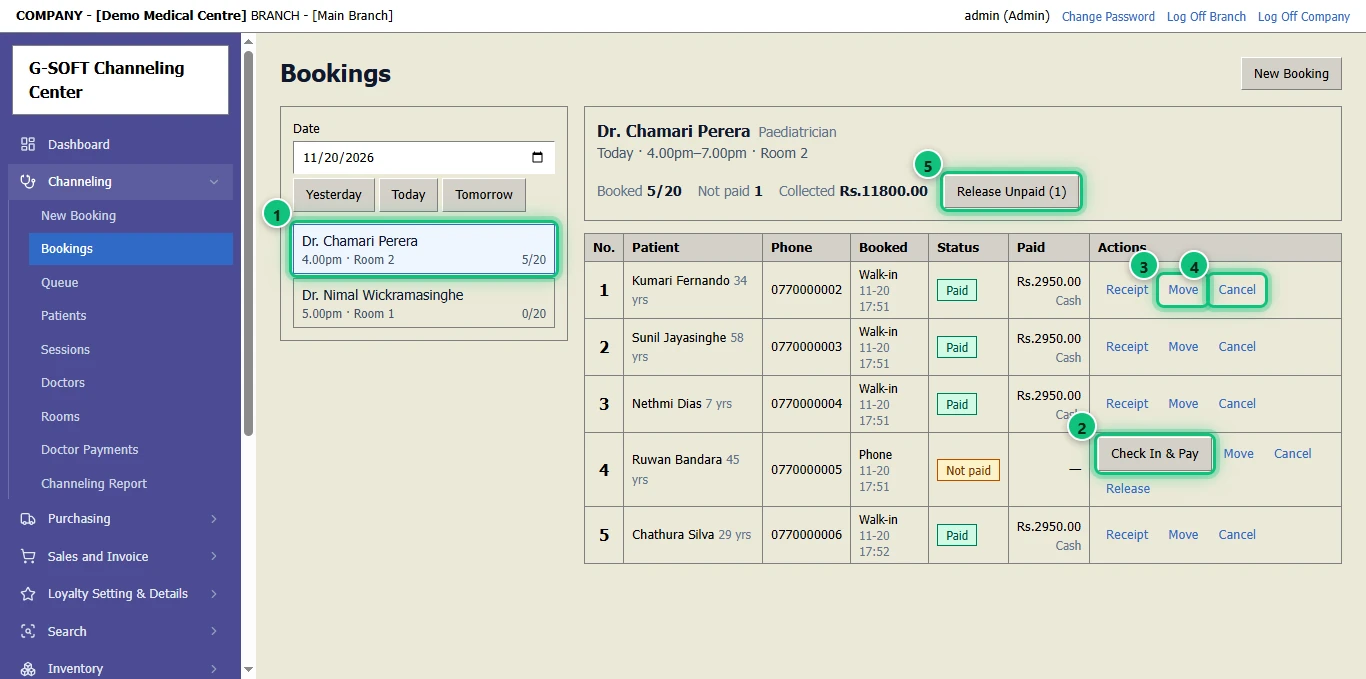
- Open Channeling → Bookings and choose the day and the session 1.
- When a phone patient arrives, click Check In & Pay 2 and take the payment.
- Move 3 moves a booking to another session; Cancel 4 cancels it — the refund follows your refund rules.
- Release Unpaid 5 frees the places of phone bookings that never came, so others can book them.
- Bookings විවෘත කර දිනය සහ සැසිය 1 තෝරන්න.
- දුරකථන රෝගියෙකු පැමිණි විට Check In & Pay 2 ක්ලික් කර ගෙවීම ලබාගන්න.
- Move 3 වෙන්කිරීමක් වෙනත් සැසියකට මාරු කරයි; Cancel 4 එය අවලංගු කරයි — මුදල් ආපසු දීම ඔබේ නීති අනුව සිදු වේ.
- Release Unpaid 5 නොපැමිණි දුරකථන වෙන්කිරීම්වල ස්ථාන නිදහස් කරයි, එවිට වෙනත් අයට වෙන් කළ හැක.