
Home / Help / G-SOFT Channeling Center
Topic 11 of 12මාතෘකාව 11 / 12
Add a user (staff or doctor)
Give each receptionist and doctor their own sign-in. The role decides what they can see.
Step 1 of 1පියවර 1 / 1
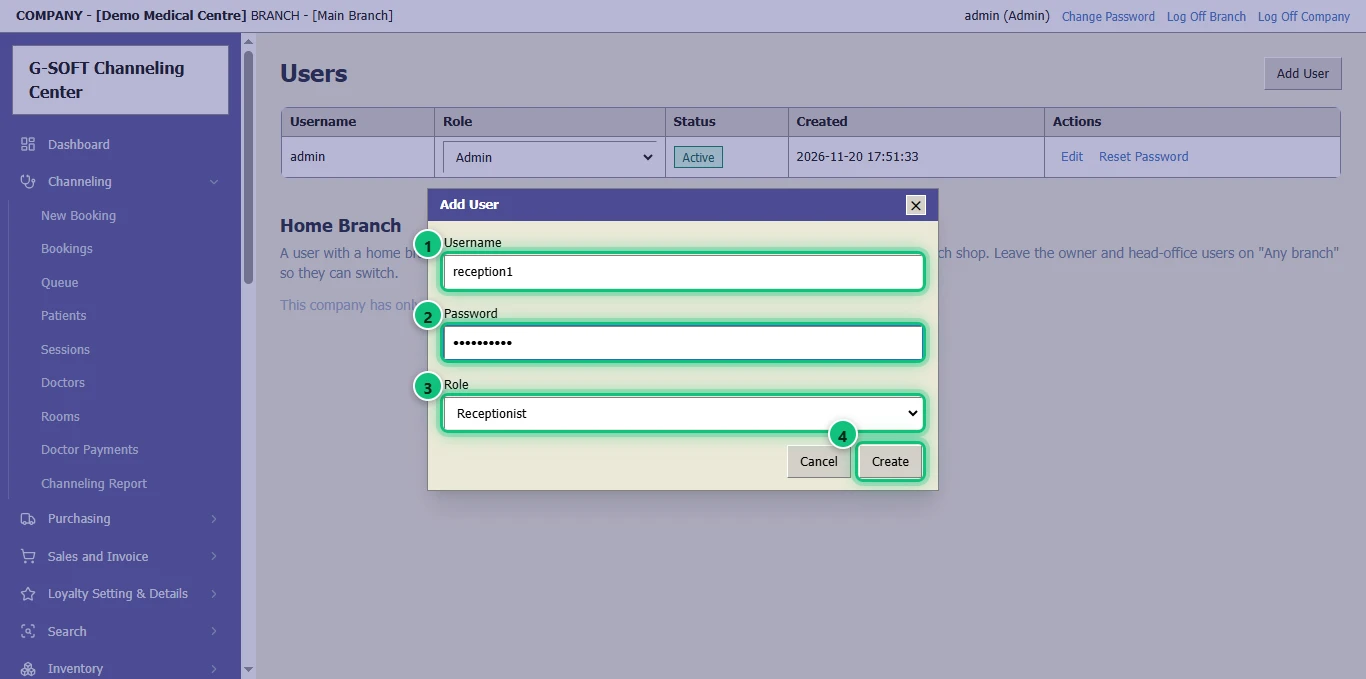
- Open Admin → Users and click Add User.
- Type the username 1 and a password 2.
- Choose the role 3: Admin — everything; Receptionist — bookings, payments, invoices; Doctor — their sessions and patients.
- Click Create 4.
- Admin → Users විවෘත කර Add User ක්ලික් කරන්න.
- පරිශීලක නාමය 1 සහ මුරපදය 2 ඇතුළත් කරන්න.
- භූමිකාව 3 තෝරන්න: Admin — සියල්ල; Receptionist — වෙන්කිරීම්, ගෙවීම්, ඉන්වොයිස්; Doctor — ඔවුන්ගේ සැසි සහ රෝගීන්.
- Create 4 ක්ලික් කරන්න.