
Home / Help / G-SOFT Textile Manager
Topic 7 of 16මාතෘකාව 7 / 16
Check stock
See how many of each product you have, in every location.
Step 1 of 1පියවර 1 / 1
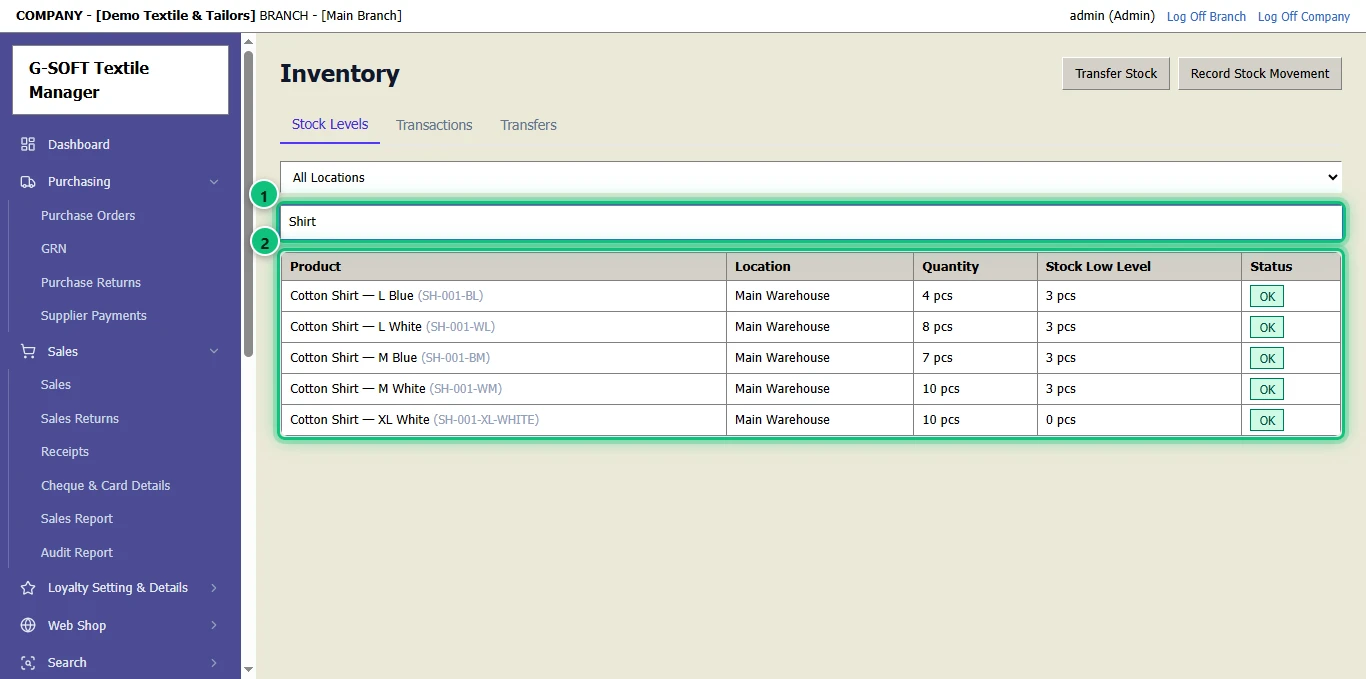
- Open Inventory → Inventory.
- Type a product name, SKU or barcode in the search box 1.
- The list 2 shows the quantity in each location. Products below their Stock Low Level also show on the Dashboard.
- Inventory → Inventory විවෘත කරන්න.
- සෙවුම් කොටුවේ 1 භාණ්ඩයේ නම, SKU හෝ බාකෝඩ් එක ටයිප් කරන්න.
- ලැයිස්තුව 2 එක් එක් ස්ථානයේ ප්රමාණය පෙන්වයි. Stock Low Level ට අඩු භාණ්ඩ Dashboard එකේද පෙන්වයි.