
Home / Help / G-SOFT Textile Manager
Topic 14 of 16මාතෘකාව 14 / 16
Daily sales report
See what you sold today — or for any dates — by payment method, by product and invoice by invoice.
Step 1 of 1පියවර 1 / 1
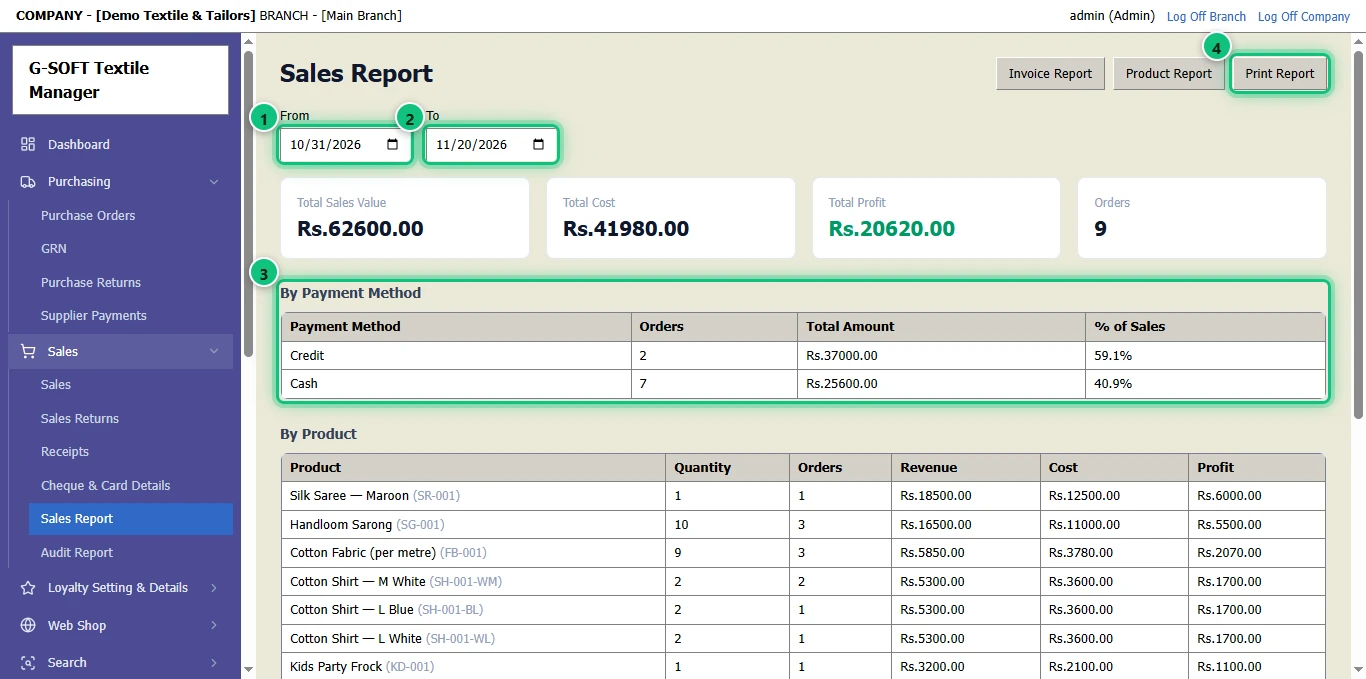
- Open Sales → Sales Report.
- Choose the dates From 1 and To 2 — the same day for a daily report.
- The report 3 shows totals by payment method, by product, and each invoice.
- Print Report 4 prints it or saves it as a PDF.
- Sales → Sales Report විවෘත කරන්න.
- From 1 සහ To 2 දින තෝරන්න — දෛනික වාර්තාවකට එකම දිනය.
- වාර්තාව 3 ගෙවීම් ක්රමය, භාණ්ඩය අනුව එකතු සහ එක් එක් ඉන්වොයිසිය පෙන්වයි.
- Print Report 4 එය මුද්රණය කරයි හෝ PDF ලෙස සුරකියි.