
Home / Help / G-SOFT Play Zone
Topic 12 of 16මාතෘකාව 12 / 16
Daily sales report
See the money taken for any day — visits and shop invoices — by payment method and visit by visit.
Step 1 of 1පියවර 1 / 1
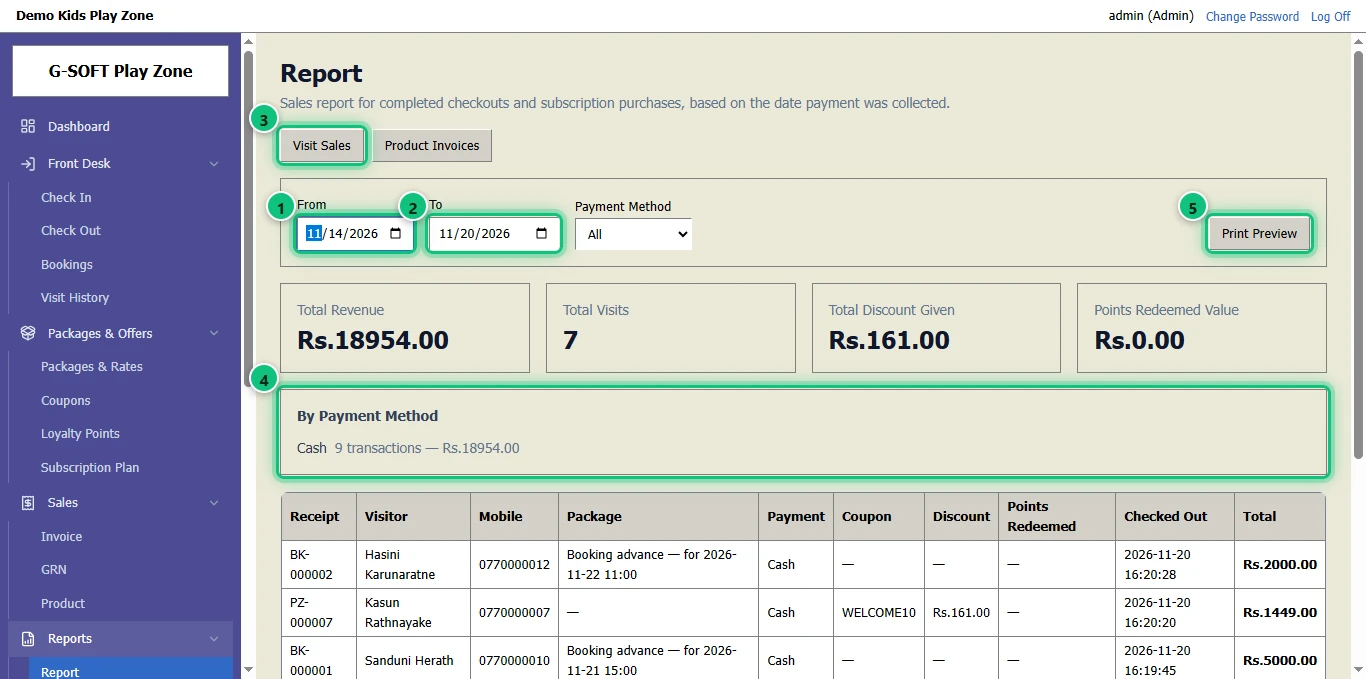
- Open Reports → Report.
- Choose the dates From 1 and To 2 — the same day for a daily report.
- Visit Sales 3 shows play-area takings; Product Invoices shows the snack shop.
- By Payment Method 4 gives the totals for cash, card and bank transfer; each visit is listed below.
- Print Preview 5 prints the report.
- Reports → Report විවෘත කරන්න.
- From 1 සහ To 2 දින තෝරන්න — දෛනික වාර්තාවකට එකම දිනය.
- Visit Sales 3 ක්රීඩා ප්රදේශයේ ආදායම පෙන්වයි; Product Invoices කෑම කවුන්ටරය පෙන්වයි.
- By Payment Method 4 මුදල්, කාඩ් සහ බැංකු මාරු එකතු දෙයි; සෑම පැමිණීමක්ම පහළින් ඇත.
- Print Preview 5 වාර්තාව මුද්රණය කරයි.