
Home / Help / G-SOFT Play Zone
Topic 8 of 16මාතෘකාව 8 / 16
Make a discount coupon
Give a coupon code for an offer — a percent or an amount off. It is typed in at check-out.
Step 1 of 1පියවර 1 / 1
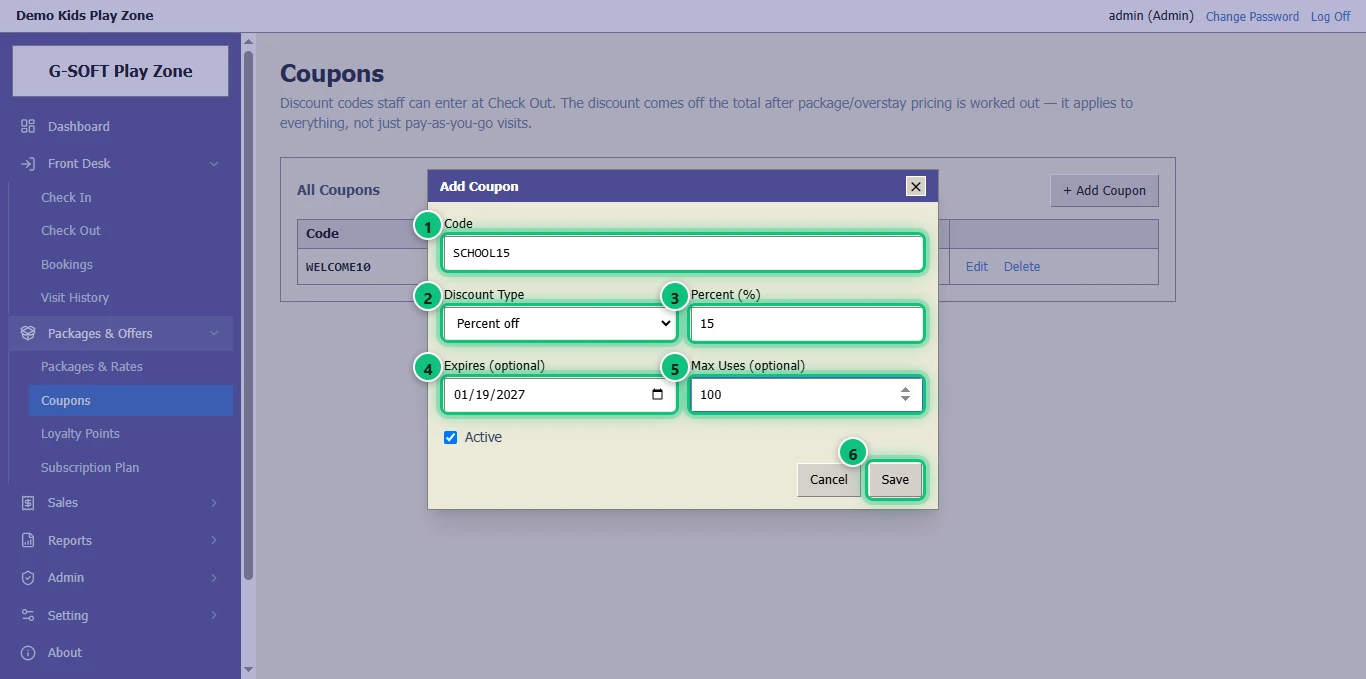
- Open Packages & Offers → Coupons and click + Add Coupon.
- Type the Code 1 customers will give you.
- Choose the Discount Type 2 — percent off or a flat amount off — and the value 3.
- Optional: an expiry date 4 and the most times it can be used 5.
- Click Save 6. At check-out, type the code in Coupon Code.
- Packages & Offers → Coupons විවෘත කර + Add Coupon ක්ලික් කරන්න.
- ගනුදෙනුකරුවන් දෙන Code 1 ඇතුළත් කරන්න.
- Discount Type 2 — ප්රතිශතයක් හෝ ස්ථාවර මුදලක් — සහ අගය 3 තෝරන්න.
- අත්යවශ්ය නැත: කල් ඉකුත් දිනය 4 සහ භාවිතා කළ හැකි වාර ගණන 5.
- Save 6 ක්ලික් කරන්න. පිටවන විට Coupon Code හි කේතය ටයිප් කරන්න.