
Home / Help / G-SOFT Channeling Center
Topic 2 of 12මාතෘකාව 2 / 12
The main screen
After signing in you see the Dashboard and the menu that opens every part of the program.
Step 1 of 1පියවර 1 / 1
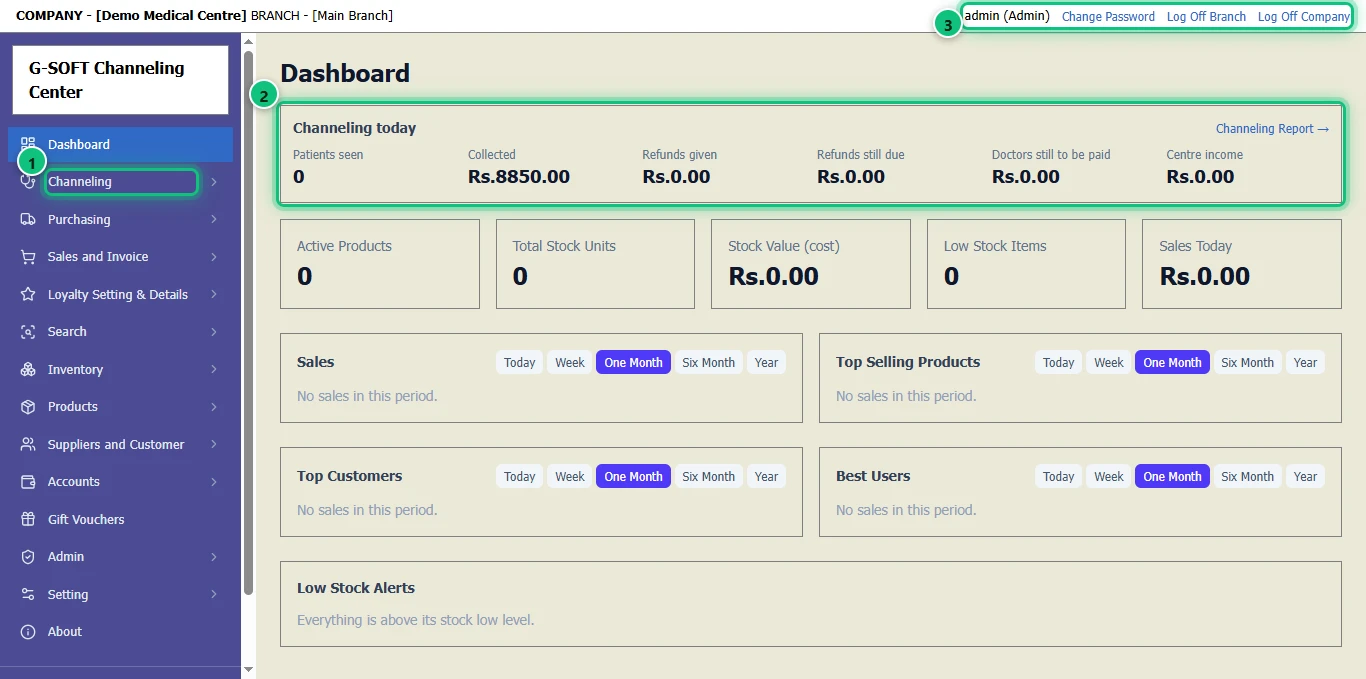
- The menu on the left opens every part of the program. Channeling 1 has New Booking, Bookings, Queue, Patients, Sessions, Doctors, Rooms, Doctor Payments and the Channeling Report. The pharmacy (Sales and Invoice, Purchasing, Products, Inventory) is further down.
- Channeling today 2 shows patients seen, money collected, refunds and what the doctors are still owed today.
- The top bar shows who is signed in 3. Log Off Branch / Log Off Company sign you out.
- වම් පැත්තේ මෙනුව වැඩසටහනේ සෑම කොටසක්ම විවෘත කරයි. Channeling 1 හි New Booking, Bookings, Queue, Patients, Sessions, Doctors, Rooms, Doctor Payments සහ Channeling Report ඇත. ෆාමසිය (Sales and Invoice, Purchasing, Products, Inventory) පහළින් ඇත.
- Channeling today 2 අද බැලූ රෝගීන්, එකතු කළ මුදල, ආපසු දීම් සහ වෛද්යවරුන්ට තවමත් ගෙවිය යුතු දේ පෙන්වයි.
- ඉහළ තීරුව ඇතුළු වී සිටින පරිශීලකයා 3 පෙන්වයි. Log Off Branch / Log Off Company මගින් ඉවත් වේ.